


Cangurul

Cangurul, rewritten from scratch.

Students write simple commands — STEP, JUMP, ROTATE — and the kangaroo hops across the field, drawing as it goes. That is how they learn what an algorithm, a loop and a procedure are.

.cng programs from Cangurul 2 open and run without any changes.

Version 3.0.6 · free · open source

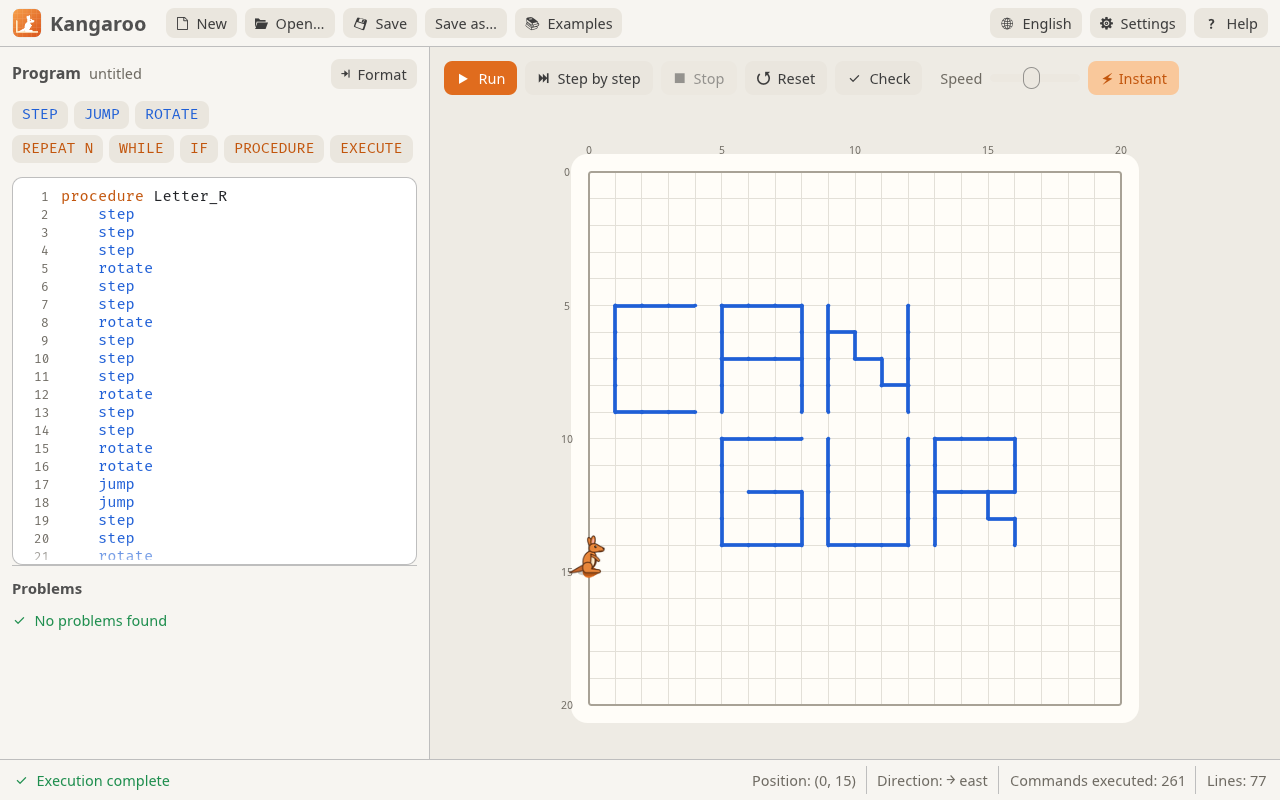
The Cangurul window: the program on the left, the field where the kangaroo wrote CANGUR on the right

What it does

The editor helps you write

Commands are highlighted and lines are numbered. While you type, completions appear, indentation takes care of itself, and Ctrl+Shift+F tidies up the whole program.

The editor: command buttons and the program with highlighted commands

The analyzer finds mistakes

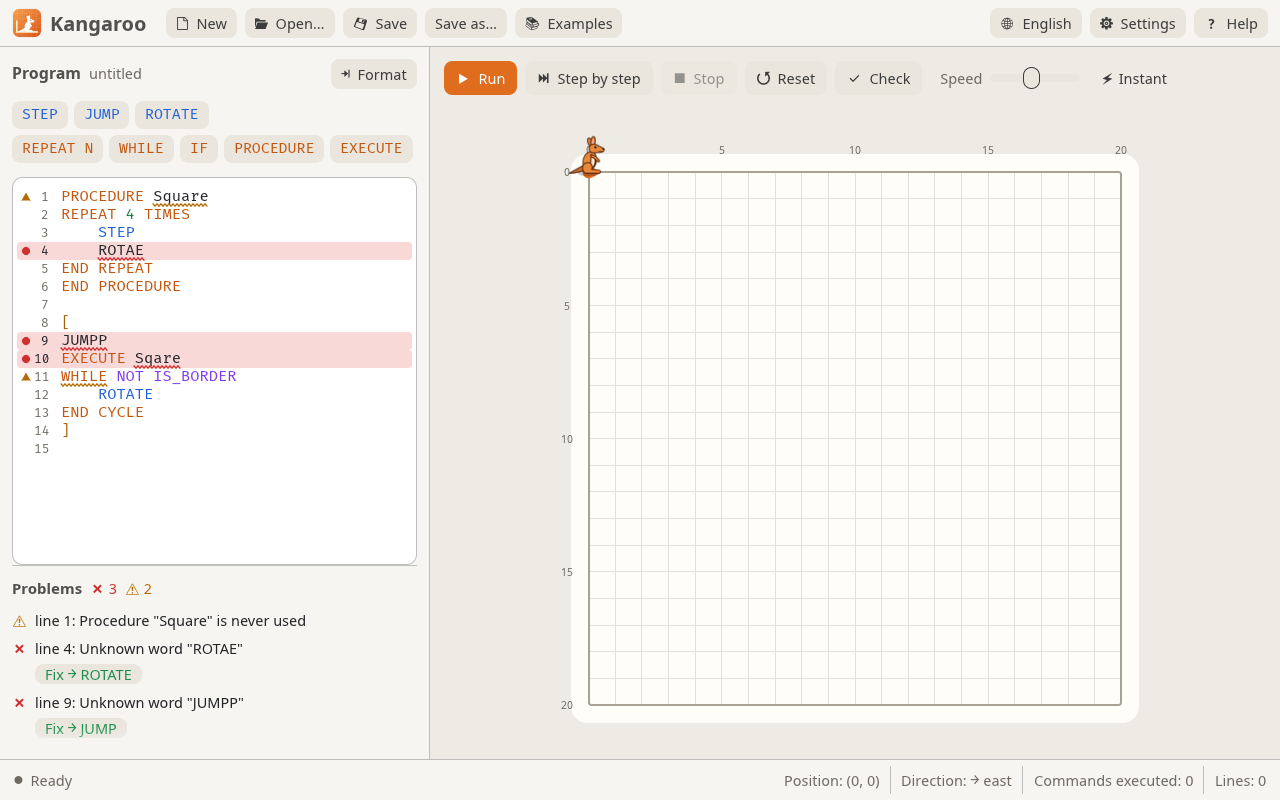
The program is checked on every edit, before it runs: misspelled words, unclosed blocks, missing procedures, loops that may never end. For a misspelled word, the Fix button puts in the right one.

The analyzer points out a mistake in the program and suggests a fix

You can see it run

The kangaroo moves smoothly and the editor highlights the line being executed. Run it step by step, pause it, slow it down or finish instantly.

The field where the kangaroo drew the letters CANGUR, with the Run and Step buttons

Compared to Cangurul 2

Everything students and teachers already know stays the same. Version 3 adds:

Cangurul 2Cangurul 3
.cng files from the old version unchanged
Checking the program as you type, with fixes
Syntax highlighting and line numbers
Suggestions while typing, auto-indent, formatting
Step-by-step execution and pause
The running line highlighted in the editor
Light and dark theme
Adjustable field size, dotted jumps
Linux and macOS, besides Windows

What's new

3.0.6

Added

  • In the Help window: links to the program's website, the email address and the source code, labelled in the interface language.

Changed

  • The macOS .dmg contains only the app and the *Applications* shortcut; the licenses are inside the app and the examples in the Examples menu.

3.0.5

Fixed

  • The links in the Help window open in the browser (the email address in the mail app).

3.0.4

Fixed

  • The kangaroo in the top row of the field is shown whole: on large screens (on a Mac, for example) its ears were cut off.
  • The Settings menu stays open while you tick its options and closes when you click outside it.

All changes →

Download

Free, no sign-up. Cangurul 3.0.6, released on October 24, 2026.

Windows 10 and 11

Installer

choose the folder and a desktop shortcut; .cng files open with a double click

Portable, no install

Windows 7 and 8

Portable archive; works on 32-bit and 64-bit

Linux

AppImage: any distribution. .deb: Ubuntu, Debian, Mint.

macOS

Apple Silicon and Intel. On first launch: right-click Cangurul.app → Open (on macOS 15+: System Settings → Privacy & Security → Open Anyway).

For computer labs

Silent install on many computers:

msiexec /i cangurul-3.0.6-windows-x64.msi /qn INSTALLFOLDER="D:\Cangurul" DESKTOPSHORTCUT=""

INSTALLFOLDER changes the folder, DESKTOPSHORTCUT="" skips the desktop shortcut.

SHA-256 checksums All versions